
Download HitPaw Photo AI – AI‑Powered Photo Editing, Enhancement & Background Removal Tool
Overview
HitPaw Photo AI is a cloud‑based, all‑in‑one image editor that leverages the latest advances in artificial intelligence to make photo enhancement effortless for anyone who touches a keyboard. Whether you are a casual Instagram user looking to make your selfies pop, a small‑business owner who needs crisp product shots, or a professional photographer seeking a quick clean‑up before a final polish in Lightroom, HitPaw Photo AI delivers a surprisingly powerful toolbox without the steep learning curve of traditional desktop suites. The platform runs directly in a web browser, which means there is no heavyweight installer, no license key to manage, and instant access from any device with an internet connection.
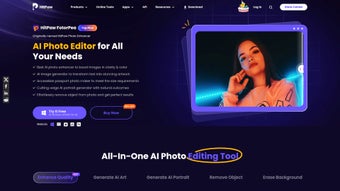
Its core modules—Image Enhancement, Object Remover, Background Remover, and Photo Generation—are all powered by deep‑learning models that have been trained on millions of pictures, allowing the software to recognize faces, edges, textures, and lighting conditions with a level of nuance that previously required manual masking and layer blending. The interface is deliberately minimalist: a central canvas, a left‑hand toolbar that expands to reveal sliders for brightness, contrast, saturation, sharpness, and a set of one‑click buttons for the AI‑driven features. The result is a workflow that can take a dull, noisy photo and transform it into a clean, vibrant image in under a minute.
Security is baked in as well; all uploads are encrypted in transit and processed on secure servers that automatically delete files after the session ends, giving users peace of mind when handling sensitive visuals. In short, HitPaw Photo AI combines the convenience of a web app with the power of AI to create a versatile, user‑friendly editing suite that works across Windows, macOS, Android, and iOS platforms via the browser. Moreover, the service offers a free tier that lets newcomers explore the most popular tools without commitment, while a premium subscription unlocks high‑resolution exports, batch processing, and priority access to the newest AI models.
This tiered approach makes the solution attractive for hobbyists, content creators, and businesses alike, ensuring that every user can scale the tool to match their evolving needs.
Key Features of HitPaw Photo AI
- AI‑Driven Image Enhancement – automatic noise reduction, color correction, and detail recovery.
- One‑Click Object Remover – erase unwanted items, people, or blemishes without manual masking.
- Smart Background Removal – isolate subjects in seconds for transparent PNGs or new backdrops.
- AI Photo Generation – create brand‑new images from textual prompts or style references.
- Batch Processing – apply the same enhancement settings to multiple files at once.
- Adjustable Fine‑Tune Sliders – control brightness, contrast, saturation, sharpness, and more.
- Cross‑Platform Web Access – works on Windows, macOS, Linux, Android, iOS, and ChromeOS.
- Secure Cloud Handling – encrypted uploads, temporary storage, and automatic deletion after editing.
- Export Options – save as JPEG, PNG, WebP, or TIFF with custom resolution and quality settings.
- Regular AI Model Updates – new filters and improvement patches are rolled out automatically.
The AI‑Driven Image Enhancement module is perhaps the most immediately noticeable feature. By analyzing the histogram, noise profile, and subject details, the engine intelligently boosts exposure, restores lost highlights, and sharpens edges while keeping skin tones natural. For photographers who shoot in low‑light conditions, this can be a lifesaver, turning a grainy night‑shot into a usable image without the artifacts that traditional denoise filters often introduce.
The Object Remover works on a similar principle: you simply paint over the unwanted element with a brush, and the AI fills the gap by extrapolating surrounding textures. The result is often indistinguishable from a clean original, and it eliminates the tedious process of cloning or healing manually. Background Removal goes a step further by detecting the primary subject—people, products, or animals—and separating it from the backdrop in a single click.
This is especially useful for e‑commerce sellers who need transparent product images or for content creators who want to place themselves against custom graphics. The Photo Generation feature taps into text‑to‑image models, allowing you to type a description like “sunset over a mountain lake with pastel colors” and receive a high‑resolution render that can be used as a background, concept art, or even a unique social media post. Batch processing lets power users queue dozens of photos, applying a consistent style across an entire catalog without repetitive manual work.
Finally, the platform’s regular AI model updates mean that new artistic filters, better edge detection, and refined texture synthesis are delivered automatically, keeping the tool ahead of competing desktop applications. All these capabilities are delivered through a lightweight web UI, meaning you never have to download massive model files or worry about GPU compatibility.
Installation, Usage & Compatibility
Because HitPaw Photo AI is a web‑based service, there is no traditional installation process. Getting started takes just a few seconds: visit the official website, click the “Start Editing” button, and you will be prompted to create a free account using an email address or a single‑sign‑on option such as Google or Apple ID. Once logged in, the dashboard presents a simple “Upload” area where you can drag‑and‑drop files or select them from your device’s file explorer.
After the upload finishes (typically under a few seconds for images under 10 MB), the editor loads the picture onto the canvas and automatically runs a quick analysis to suggest optimal enhancement settings. You can accept the AI’s recommendation or manually adjust the sliders located on the left toolbar. For object or background removal, simply activate the corresponding button, paint over the area you wish to delete, and let the AI do the heavy lifting.
The generated image appears instantly, and you can fine‑tune the mask with an eraser or brush if needed. When you’re satisfied, click “Export,” choose your preferred format (JPEG, PNG, WebP, TIFF), set the resolution, and download the final file to your device.
The platform is designed to be universally compatible. Since all processing occurs on HitPaw’s secure servers, the only requirement on the user side is a modern web browser that supports HTML5 and WebGL—Chrome, Edge, Firefox, Safari, and Opera all work flawlessly on desktop operating systems such as Windows 10/11, macOS 12‑13, and most Linux distributions. Mobile users on Android 10+ or iOS 13+ can also access the editor through Chrome, Safari, or any Chromium‑based browser, making it a truly cross‑platform solution. No GPU drivers, RAM upgrades, or additional plugins are necessary; the AI models run remotely, so even low‑spec devices can benefit from high‑quality enhancements. The service also respects platform‑specific accessibility features, offering keyboard navigation, high‑contrast mode, and screen‑reader labels to ensure an inclusive experience for all users.
While the core service is free, HitPaw offers a premium subscription that unlocks unlimited high‑resolution exports, batch processing, and priority access to the newest AI models. The subscription can be purchased directly from the “Upgrade” tab in the dashboard, and payment is processed securely via Stripe or PayPal. For users who prefer a trial, a 7‑day free premium window is automatically activated after the first ten edits, allowing you to explore the full feature set without commitment. Because everything is cloud‑based, updates are seamless—new algorithms, filters, and bug fixes are deployed on the server side, meaning you always work with the latest version without needing to refresh or reinstall anything. If you ever need to export a project for offline archiving, the tool provides an “Export Project” option that bundles the original file, applied settings, and a JSON‑style metadata file, ensuring you can reproduce the same edits later on any compatible device.
Pros & Cons
Advantages
- Instant AI processing – no need for powerful local hardware.
- One‑click object and background removal saves hours of manual work.
- Cross‑platform accessibility via any modern browser.
- Secure, encrypted uploads with automatic file deletion.
- Free tier available for casual users; premium adds high‑resolution export.
- Batch processing streamlines workflow for large image sets.
- Regular AI model updates keep features cutting‑edge.
Disadvantages
- Reliant on an internet connection; offline editing is not possible.
- Large files (>20 MB) may take longer to upload and process.
- Advanced retouching tools (e.g., layer masks, curves) are not yet included.
- Premium subscription required for unlimited high‑resolution exports.
- AI results can occasionally produce artifacts on extremely complex textures.
- Limited direct integration with desktop DAM (Digital Asset Management) systems.
Frequently Asked Questions
Is HitPaw Photo AI really free to use?
Yes, the basic version is completely free and includes unlimited low‑resolution edits, AI object removal, and background extraction. Premium features such as high‑resolution export, batch processing, and early access to new AI models require a paid subscription.
Can I use HitPaw Photo AI on my smartphone?
Absolutely. The web application works on Android and iOS browsers. Simply navigate to the site, sign in, and you’ll have the same editing capabilities as on a desktop.
How does the background remover handle hair or fuzzy edges?
The AI model is trained on millions of portrait images and uses a combination of edge‑detection and semantic segmentation to preserve fine details like hair strands. In most cases the result is clean, but a quick manual touch‑up with the eraser tool can perfect any remaining artifacts.
Are my uploaded photos stored permanently?
No. All files are encrypted during transfer and are automatically deleted from HitPaw’s servers after the editing session ends (or after a maximum of 24 hours for premium users who enable cloud storage). This ensures privacy and compliance with data‑protection regulations.
What image formats are supported for import and export?
Import works with JPEG, PNG, WebP, BMP, and TIFF files up to 25 MB. Export options include JPEG, PNG, WebP, and TIFF, with adjustable quality settings and optional alpha channel preservation for PNG/TIFF.
Does HitPaw Photo AI offer any collaboration features?
Yes, premium users can generate shareable edit links that allow teammates to view or comment on a project without needing their own account. This streamlines feedback loops for marketing teams and freelance collaborations.
Conclusion & Call to Action
HitPaw Photo AI has positioned itself as a compelling middle ground between heavyweight desktop editors and simple mobile filters. Its AI‑driven core features—enhancement, object removal, background extraction, and even image generation—deliver impressive results with a fraction of the time and technical knowledge normally required. The web‑only delivery model removes the barrier of hardware limitations, allowing anyone with a browser to benefit from cutting‑edge neural networks.
While the reliance on an internet connection and the absence of deep layer‑based editing tools might deter power users, the overall value proposition for everyday creators, small businesses, and social‑media enthusiasts is strong. If you are looking for a secure, fast, and user‑friendly way to polish photos, clean up unwanted elements, or experiment with AI‑generated visuals, HitPaw Photo AI is well worth a try. Sign up for the free tier today, test the one‑click object remover, and experience how quickly a dull snapshot can become a share‑ready masterpiece.
For professionals who need high‑resolution outputs and batch workflows, the premium subscription unlocks the full potential at a competitive price, and the regular AI updates ensure the tool stays ahead of emerging trends.
Overall Rating: 4.5/5
Pros: Fast AI processing, intuitive UI, cross‑platform, strong privacy, batch workflow.
Cons: Requires internet, limited advanced retouching tools, premium cost for unlimited high‑res.



.png)



